
Skip to content
A busy river port showing connected shipping locations and goods movements

Mission Control

Your operation at a glance. Your priorities in view.

Build a home view around the work you need to do. Choose from Orbit’s widget catalogue to bring tasks, stock, storage, locations, due diligence and partner activity together. Each person can shape their own view without changing what everyone else sees, then open the records behind the summary.

Book a demo

For the people doing the work

One grain business. A different view for every user.

Grain traders can view stock across storage locations and instantly see where capacity is available. The trader, storage operator and assurance reviewer can each choose a different Mission Control view from the same connected records.

Illustrative record

Trader’s view · Grain holdings

  • 01Stock by location · Compare holdings
  • 02Stock ageing · Review holding time
  • 03Deliveries by supplier · Review incoming volume
Grain trader

Grain trader

See what is held before planning the next movement.

Bring Stock on hand, Stock by location, Stock ageing and Deliveries by supplier into your home view. See where grain is held, how long it has been there and which suppliers are contributing volume, then open the relevant stock record before arranging a movement.
Illustrative record

Storage view · Incoming load

  • 01Storage levels · See how full each site is
  • 02Storage headroom · Find available capacity
  • 03Stock by asset · Open Move Inventory
Storage operator

Storage operator

Find room for the next delivery, instantly.

Use Map, Storage levels and Storage headroom to see recorded capacity across your silos, sheds and sites. Compare storage availability before allocating an incoming load, then open the location or stock record. Your widget choices do not change the trader’s home view.

Illustrative record

Reviewer’s view · Grain client

  • 01Chain of custody · Review recorded models
  • 02Certifications · Check recorded validity
  • 03Evidence expiring soon · Prioritise renewal review
Certification company

Certification company

Put the client’s evidence ahead of the stock totals.

When reviewing a grain client’s programme, focus on Chain of custody, Certifications and Evidence expiring soon. Follow the client’s connected locations, lots and supporting records for review. Each user can choose the widgets relevant to their responsibilities without changing another person’s view.

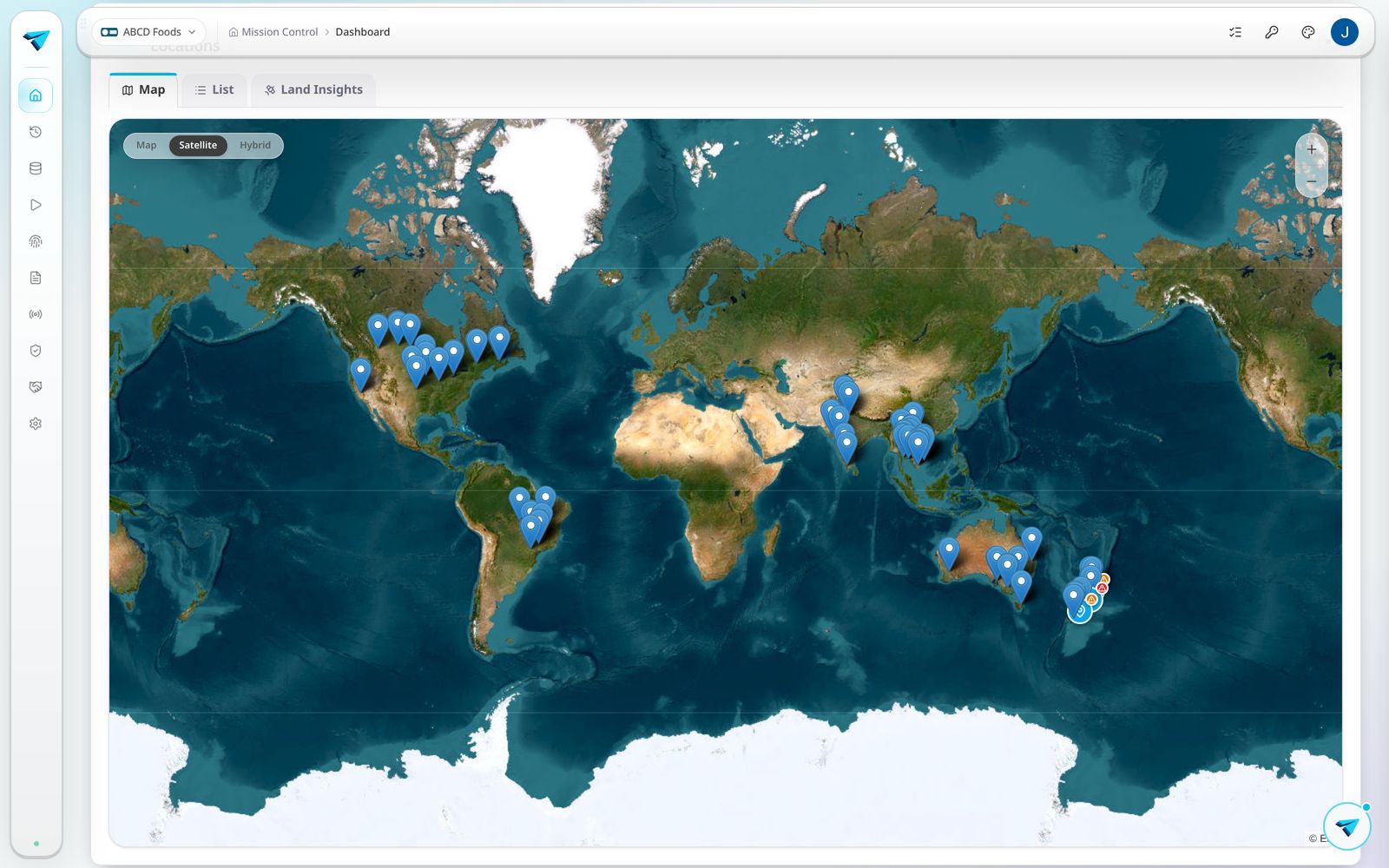
Preserved Orbit Mission Control demonstration showing mapped locations

Mission Control. Built around the work.

01

A catalogue for your role

Choose what matters

Choose from Orbit’s home widget catalogue rather than starting with a fixed dashboard. Combine the views relevant to your responsibilities, from daily work to stock, compliance and partner relationships. Your selections are personal, so different people can work from the same operation with different priorities in view.

  • A personal home view without changing anyone else’s.
02

Tasks and next actions

Start with the work

My tasks puts task recording within reach. Up next gathers draft lots, invitations, incoming shares and questions waiting on you. Quick actions, Scan & look up, Messages and Recent activity help your team move from seeing the work to getting it done.

  • Bring pending actions and recorded activity into reach.
03

Stock, storage and movement

Plan with stock in view

Stock on hand, Stock by location and Stock by asset show what is held and where. Storage levels, Storage overview and Storage headroom help plan incoming deliveries against available capacity. Stock ageing and Stock in and out (30 days) bring holding time and movements into the same view, while Deliveries by supplier (90 days) shows who is supplying your volume.

  • See holdings, movements and available storage.
04

Due diligence and assurance

Keep assurance moving

Bring Due diligence in progress, Due diligence by risk, Chain of custody, Certifications and Evidence expiring soon into your home view. Teams working with applicable food traceability requirements can add FSMA 204 readiness. These widgets help identify records needing review and follow through to the supporting detail, rather than treating a summary as a compliance decision.

  • Review statements and evidence before handover.
05

Partners and shared evidence

Follow partner activity

Halo Connect inbox shows partner shares waiting to be reviewed and brought in. Partners keeps supply chain relationships in view. Live link scans (30 days) and Scans by country show recorded engagement with published product information, helping teams understand where that information is being accessed.

  • See incoming shares and product engagement.
06

Locations, process and field activity

Connect place and progress

Map brings sites, plots and recent activity together geographically. Process flow shows work across the stages of your chain, while Active lots, Lots by status and Tasks recorded (30 days) provide complementary operational views. Autopilot shows Scout missions running in the background and their progress.

  • Move from mapped locations to the work behind them.
07

Custom views with Orbit

Ask for the view you need

When a standard widget does not answer your question, describe the view you need to Orbit. Its widget builder can create a custom view from supported records already held in your organisation, which you can add to your own Mission Control alongside catalogue widgets.

  • Create a custom widget with Orbit.

One capability. Different evidence needs.

Illustrative records show how the same capability supports different teams.

Illustrative evidence

Trader’s view · Grain holdings

Bring Stock on hand, Stock by location, Stock ageing and Deliveries by supplier into your home view. See where grain is held, how long it has been there and which suppliers are contributing volume, then open the relevant stock record before arranging a movement.

Shared on your terms

Record
Stock by location · Compare holdings
Context
Stock ageing · Review holding time
Evidence
Deliveries by supplier · Review incoming volume

Illustrative workflows and records use demonstration data. Preserved Orbit captures, where shown, are not live customer records. Aerial imagery: LINZ.

Keep the work and its evidence connected.

A shared operations view for teams managing products, locations, partners and evidence.

Book a demo